
Data Output Specification

What is a Data Output Specification?
A data output specification is a way of organising and communicating the process of taking data you want from where it is stored into a place and format that allows you to use it for evaluation. Typically, it takes the form of a spread sheet that sets out the evaluation questions, the data required to answer them, the location of that data and the format that is needed with varying levels of complexity. Having a logic model, process flow, and evaluation plan all aid in this step of your evaluation.
Having an output specification is particularly useful if:
- You are working with large volumes of data
- You are working with data which does not belong to you and needs to be extracted by another party or where privacy agreements mean the evaluator cannot have access to the raw data
- You are working with a team that has a data manager/analyst/similar who is different from the person doing the evaluation
- You have data that needs cleaning or combining to be usable
- If you like to organise your thoughts and processes in this way

How to make and use a Data Output Specification
1. An output specification should be made in a way that works for your organisation so it does not have to follow this exact format; what we provide here is a structure we have found to be effective and understandable within our team.
- Open a spreadsheet and create the following columns (or download this template)
- Evaluation Questions
- Output required
- Definitions
- Data item (if you have a data dictionary)
- Date parameters
- Filter criteria
- Logic
- Notes
- Output
2. Fill out for your first evaluation question
- Using your evaluation plan enter your first evaluation question into column A. Evaluation Questions.
- In column B. Output Required enter as many output items as required to answer that question working your way down the column. Once you have all the items you need, merge down column A evaluation question to match the number of rows of data items you have, like the diagram below (fig.1)
- Enter any definitions where an output may be at all ambiguous. For example, your evaluation question may focus on a specific part of the service, so if you are counting referrals you may need to define referrals as only for that part, E.g., referrals for caseworker supporter only. Similarly, if you want to count people who have completed a course you would need to define what completing meant, such as ‘completion = attended at least 5 sessions’ or ‘completed = has a discharge note’.Merge down to match the outputs as necessary.Definitions like these should have been decided in the service planning phase so you should have few or no decisions to make about this, you just need to refer to earlier documents and set them out here so whoever is extracting the data can set the right criteria to get the information required.
- If you have a data dictionary then use that to fill in the data item into column D, this may be a name or number.
- Enter the dates/times between which you want to look at data. This may be the quarter, term, year or other period you are evaluating, such as 01/03/2025-30/06/25.
- If necessary, skip along to H and enter any notes that may be useful to whoever is extracting the data.If you are not the person extracting the data stop at this column, go back to column A and repeat for all the evaluation questions.
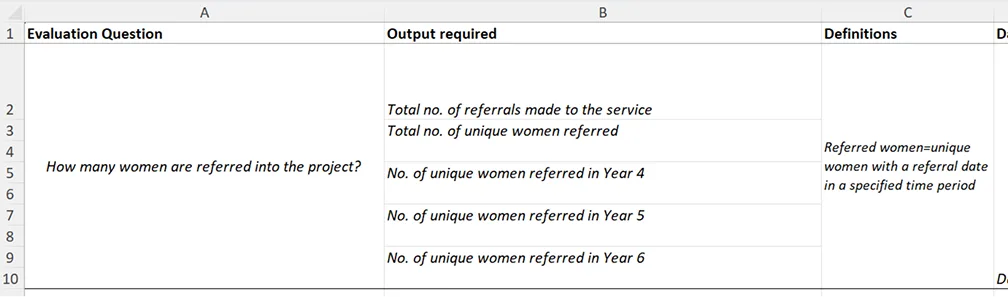
Fig. 1: Here you can see that the evaluation question may be answered in two ways, both with a total number of referrals and with unique women referred, since some women may have been referred more than once.
3. Once the output specification has been filled in as above, meet with the person/people extracting the data and talk through to see if there are any areas that need clarification. It is helpful if the output specification document is shared prior to meeting so that everyone is familiar and has had time to see if there are issues.
4. The person/people extracting the data should use columns F and G to enter details of how they extract the data. The logic column is particularly important because this can be used by the evaluator to understand and provide explanation of the final numbers that appear in the evaluation. For example, your logic column might look like this: Count of unique person IDs where discharge note date is between date parameters and person is female.
5. The person extracting the date should enter data extracted either in columns beyond I or if a table or more than a single number is required as an output then they may make a new tab within the spreadsheet and direct you to it.
This output specification should then allow the evaluator to see all the information they need to create a report based on the evaluation questions they have planned to answer.